
Monitor your solar panels. Skip the subscription.
SolarMark connects directly to your solar inverter over your local network. No cloud account, no monthly fees, no middleman. Real-time production data, history and savings tracking right on your Android or iOS device.
100% Local
No cloud required
No Account
Your data stays yours
Live Data
5-second updates
Live Power
4.82 kW
Today
28.4 kWh
≈ $5.68 saved
Before you install: Enable Modbus over TCP on your solar equipment. Sample Instructions are provided.
Some newer models require an installer login to toggle this setting.
Make sure everything is functional during the 14-day trial before purchasing.
Core Features
All of the features you actually want.
SolarMark gives you a complete picture of your solar production without locking you into a subscription. Live power, daily energy, savings, history and CO₂ avoided, all on one clean dashboard.
- Real-time production scaled to your system capacity
- Grid import/export monitoring and tracking
- Today / month / year totals at a glance
- Savings, CO₂ avoided, and trees planted updated live
- All-time peak power, persisted across sessions
Local Modbus TCP Polling
Talk directly to your solar inverter. No cloud, no account, no third party in the middle.
Grid Import / Export
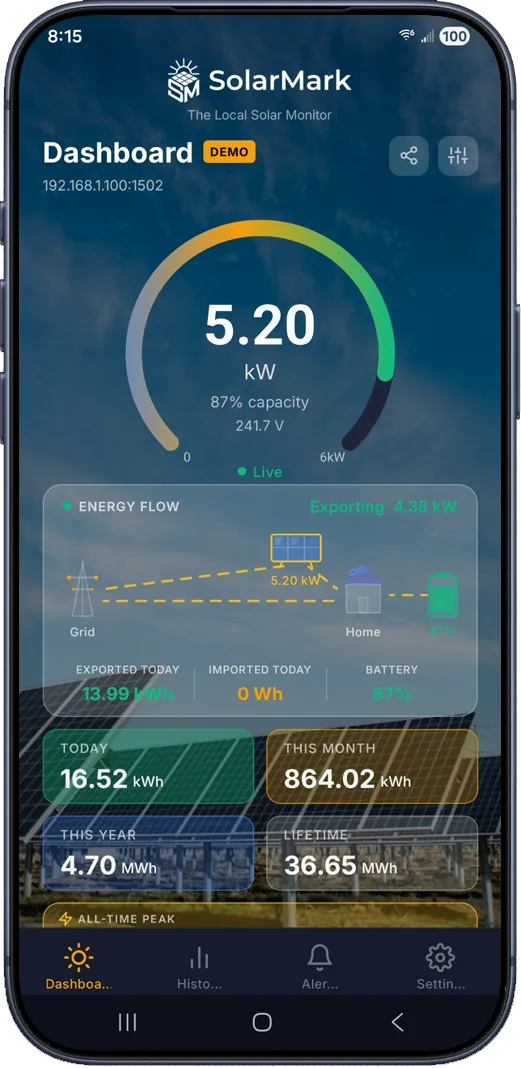
See exactly how much power you're sending to the grid and drawing from it. Track import and export in real time alongside your solar production.
Live Power Gauge
Real-time power readings updated every 5 seconds while the app is open, scaled to your system's rated capacity. Inverter voltage displayed beneath the gauge.
Multi-Device Support
Monitor multiple inverters and battery storage devices with State of Charge (SoC), temperature, voltage monitoring, and power flow.
Energy History & Charts
Daily records stored locally in SQLite. View the past 30 days, 3 months, 12 months, or your entire lifetime of production. Includes cross-referencing, year-over-year comparisons, and power flow charts.
Savings Tracking
Set your electricity rate and currency (£ $ € ¥ A$ C$) and watch your daily savings add up in real time. Toggle live financial flow to see generation in dollars per hour instead of kW.
CO₂ Saved & Trees Planted
See the environmental impact of your system displayed as CO₂ avoided or equivalent trees planted, calculated from your actual generation data.
Localized Power Predictions
GPS location and built-in integration with Open-Meteo gives you an expected daily power generation scaled by the system's calibrated peak power.
Customizable Dashboard
Make it yours. Change gauge colors, card colors and opacity, toggle or upload your own background image, and save or load your themes, or choose from included presets.
Backup & Restore
Never lose your history. Back up your SolarMark data and restore it if your device is lost, replaced, or reset.
Compatibility
Wide Inverter Support
SolarMark now supports a growing list of inverter brands, both SunSpec Standard and vendor-specific protocols.
SunSpec Standard
Select "SunSpec Standard" when adding inverters or batteries from these vendors:
- SolarEdge
- SMA (Sunny Boy / Sunny Tripower)
- Fronius (Primo / Symo / GEN24)
- Fimer (formerly ABB)
Vendor-Specific Protocols
These brands use their own Modbus register maps; select the specific vendor when adding your device:
- Huawei SUN2000
- Sungrow SG Series
- Growatt
- Solax Standard + Hybrid
- GoodWe
- Deye
Don't see yours? Email us: support@solarmark.us
See it in action
One app. Every setup.
Whether you run a single inverter, multiple arrays, or a hybrid system with battery storage, SolarMark handles it all from one clean dashboard.
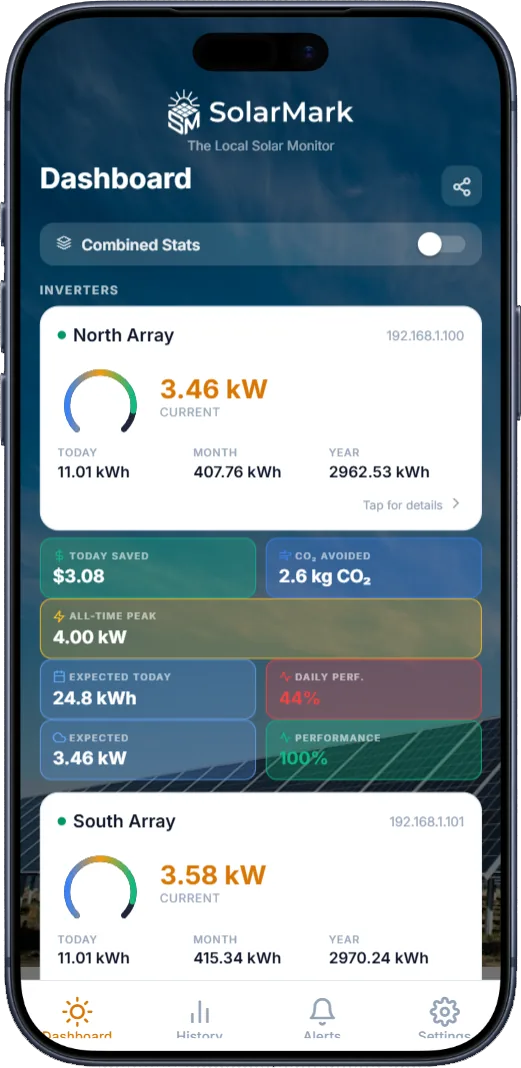
Multiple inverters, one dashboard
Running more than one array? SolarMark polls each inverter in parallel and rolls the data into combined totals, or drill into any individual unit for details, history, and peak stats.
- Combined stats toggle for system-wide totals
- Independent polling per inverter
- Per-inverter savings & CO₂ tracking
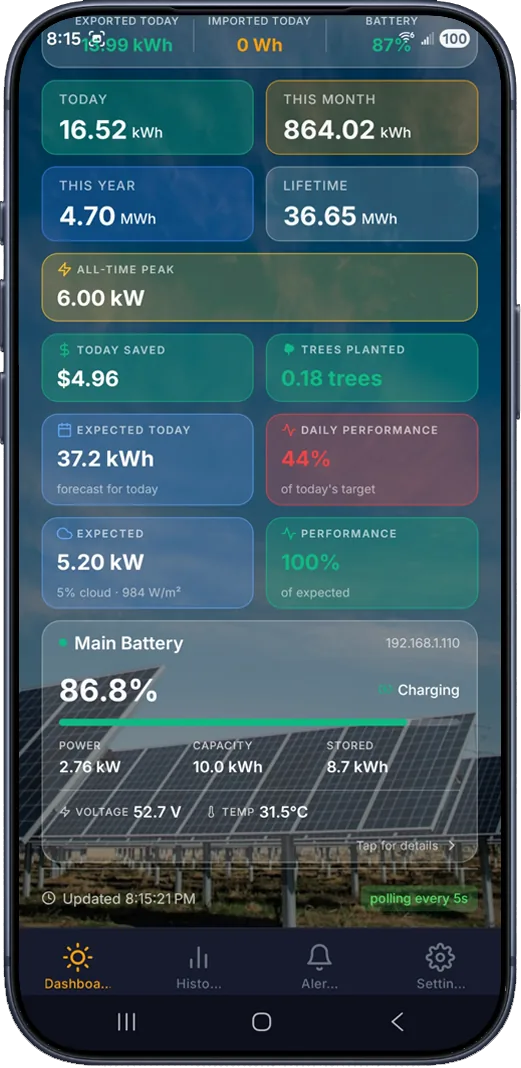
Full battery storage support
Monitor one or multiple battery banks side by side with your inverter. Track State of Charge, charging status, available capacity, and stored energy in real time.
- Live State of Charge per battery
- Charging / discharging indicators
- Battery history CSV export
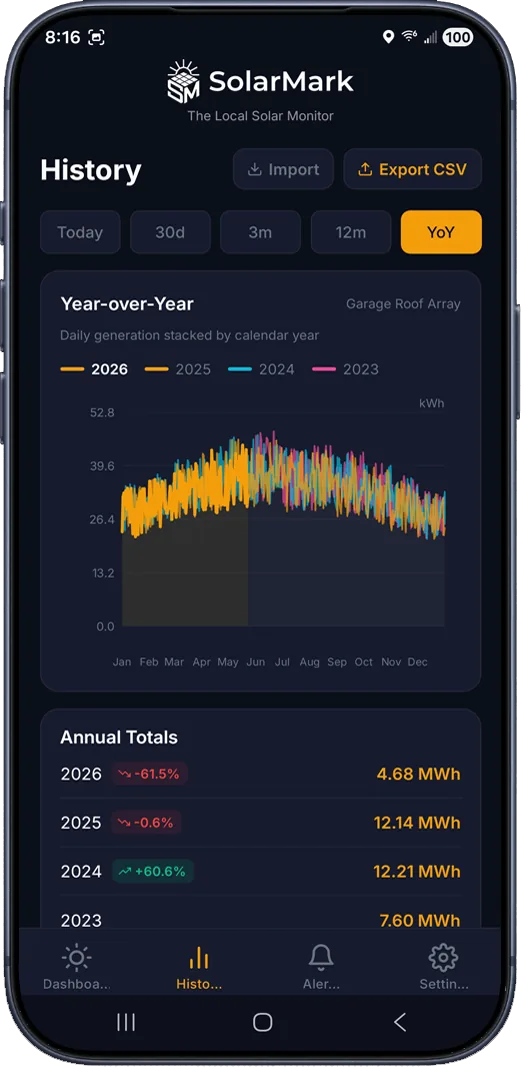
Built for power users
Deep control over your data
From live notifications to home screen widgets, CSV exports, and remote monitoring, SolarMark is packed with the tools serious solar owners actually want.
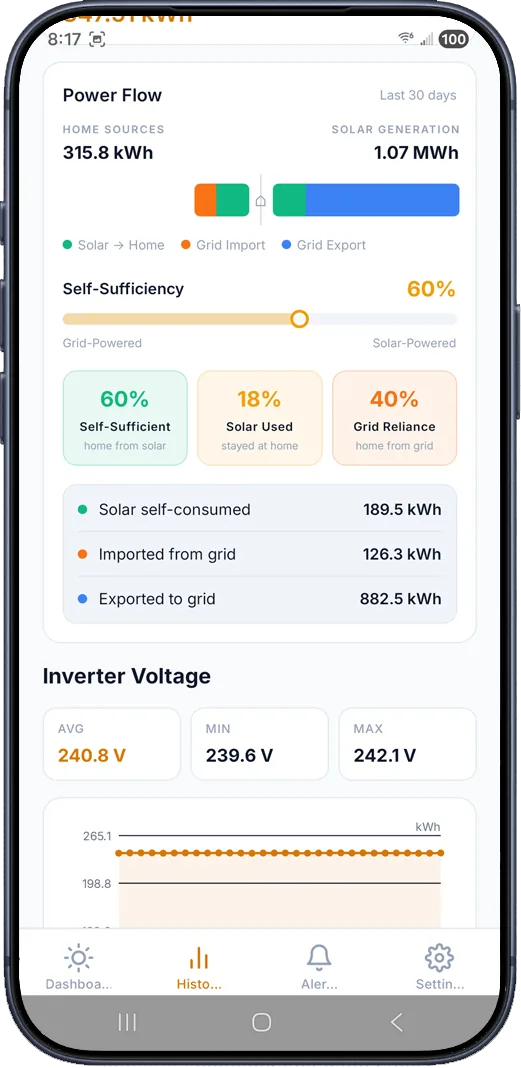
Smart Alerts
- Seven configurable alert types: no generation by a set time, inverter offline, power below a threshold, battery low, battery temperature, battery voltage, and system underperforming
- Weather-gated: alerts won't fire if irradiance is too low to expect generation
- Each alert fires at most once per day to avoid spam
- GPS warning shown if no location is set on the inverter
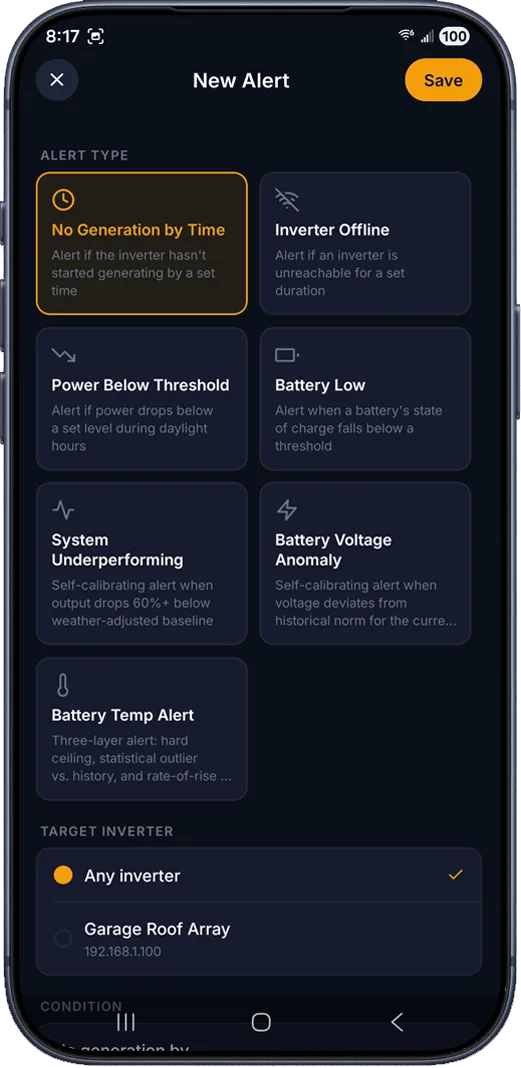
Grid Import / Export
- Real-time grid power reading: see import and export as it happens
- Daily, monthly, and lifetime import/export energy totals
- Net energy balance showing self-consumption vs grid reliance
- Grid power integrated into the dashboard alongside solar production
Notifications & Background
- Persistent live notification showing current power and today's energy
- Configurable background polling interval (15 min / 30 min / 1 hr / custom)
- Stay connected to your system without opening the app
Android Home Screen Widgets
- Large widget (4×2): inverter name, current power, today's and this month's energy
- Small widget (2×1): current power and today's energy at a glance
- Peak generation indicator: widgets highlight when it's the peak power generation time for the day
- Tap to jump straight into the app
Sharing & Export
- Share-as-image from the dashboard or inverter detail screen
- CSV export of energy history with a custom date range
- CSV export of battery State of Charge, temperature, and voltage history
Advanced Settings
- Automatic network scan to discover Modbus-enabled devices on your local network
- Modbus TCP setup walkthrough
- Remote monitoring guide (VPN / reverse proxy)
- Built-in connection diagnostics: reachability, port test, Modbus handshake
All-time peak
Track your system's lifetime peak power output, persisted across sessions.
Dark / Light theme
Choose dark, light, or follow your system preference automatically.
CSV exports
Export energy and battery history for your own spreadsheets or analysis.
Connect locally, monitor anywhere
SolarMark speaks Modbus TCP to your inverter on your home network. Want off-site access? Follow our suggestions for VPN or reverse proxy setups, and keep full ownership of your data.
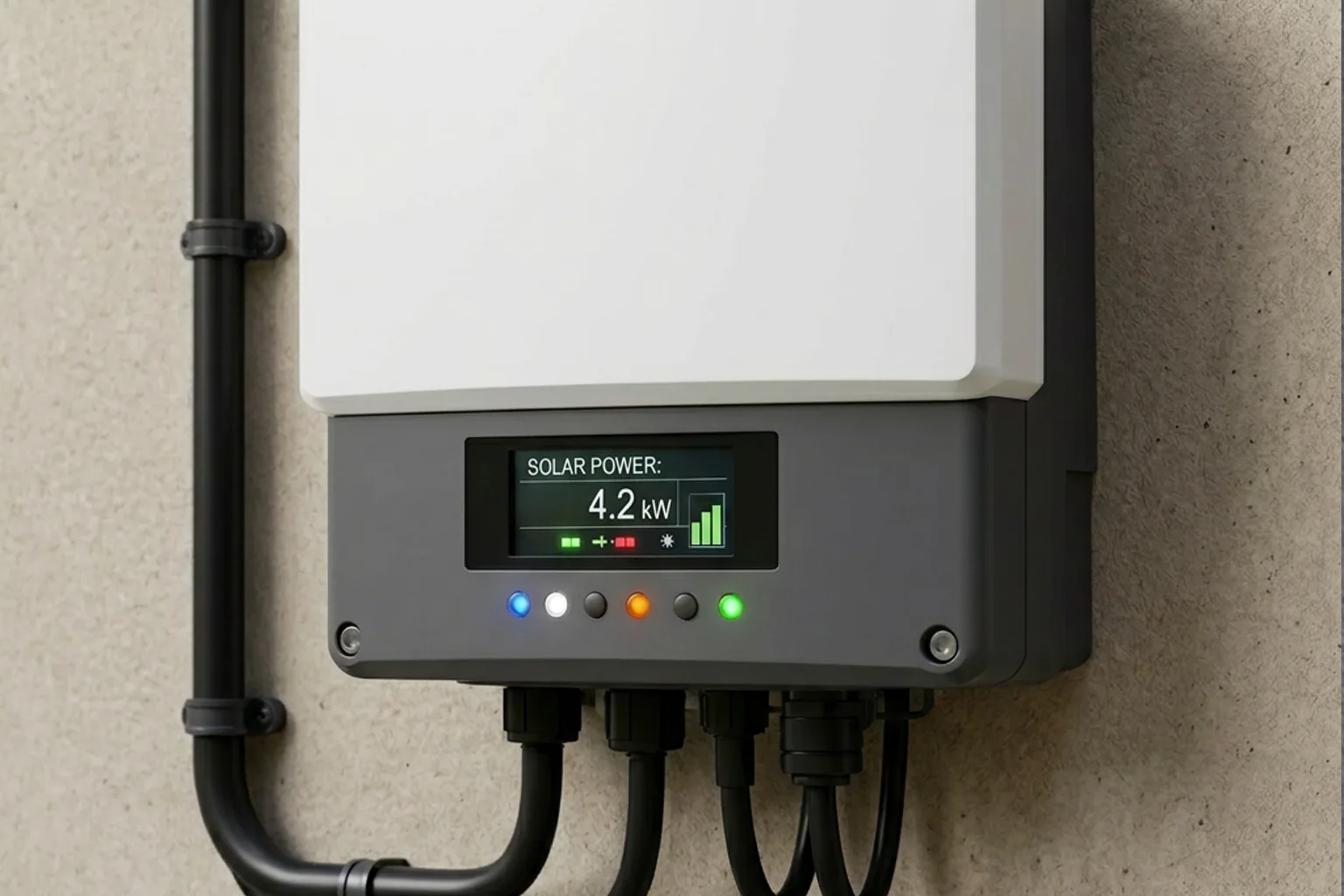
Customization
Your dashboard, your style
SolarMark gives you full control over how your dashboard looks. Adjust colors, opacity, and backgrounds, then save your creation as a reusable theme. Pick from included presets or build your own from scratch.
Full Color Control
Customize power gauge colors, card background colors and opacity to match your style.
Save & Load Themes
Save your custom themes and load them anytime. Switch between your creations with a tap.
Included Theme Presets
Choose from built-in themes like SolarMark or Matrix, or use them as a starting point for your own.
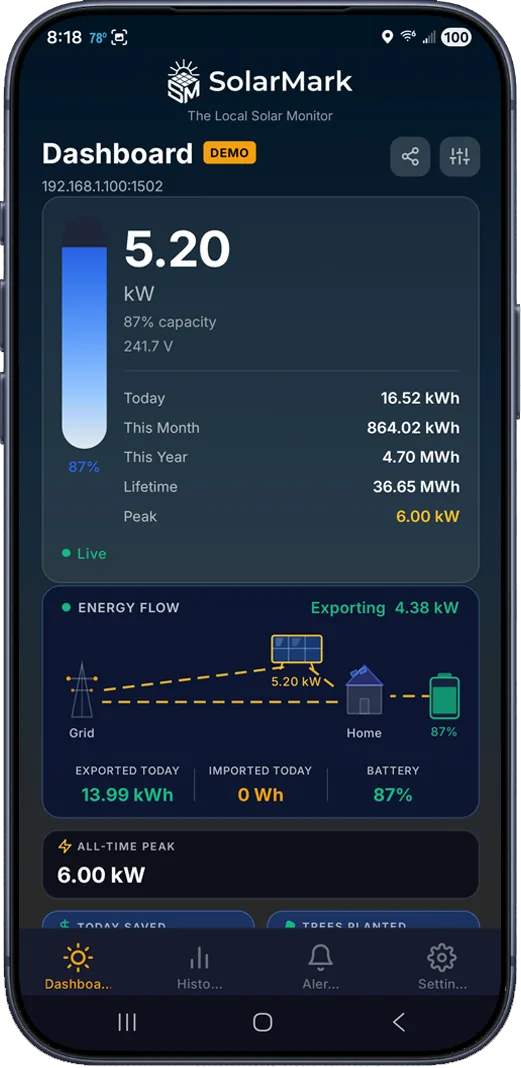 SolarMark
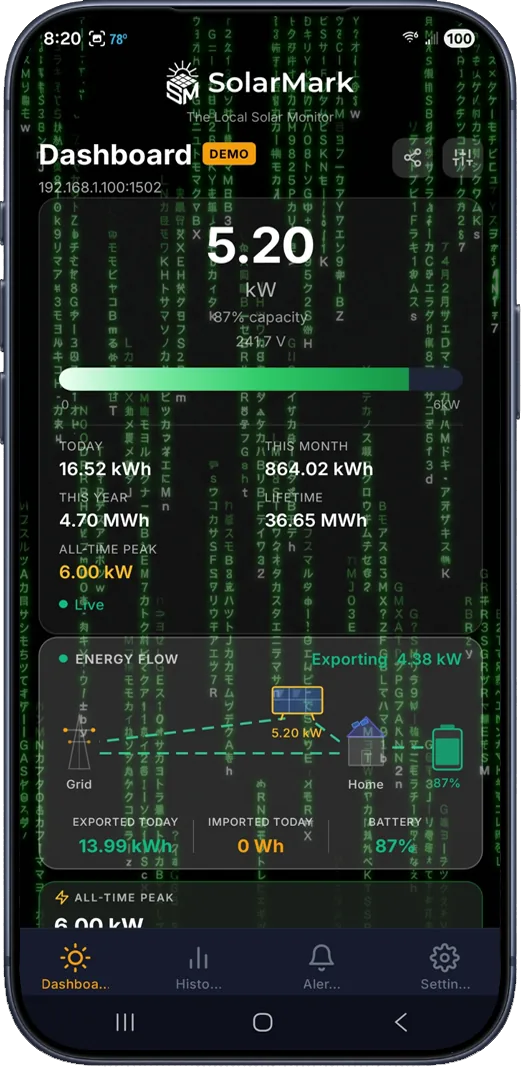 Matrix
Why SolarMark
You bought the panels. Own the data too.
Compare SolarMark to the typical cloud subscription experience.
| Feature | SolarMark | Typical Cloud |
|---|---|---|
| High-Frequency Local Updates | ||
| No monthly subscription | ||
| No cloud account required | ||
| Data stays on your network | ||
| Works if internet is down | ||
| Multi-inverter & battery support | ||
| Home screen widgets (Android) | ||
| CSV history export | ||
| Configurable currency & rate | ||
| Backup & restore your data |
SolarMark is an independent app and is not affiliated with or endorsed by any other solar company.
Getting Started
A one time setup. A lifetime of savings.
Think of SolarMark like a smart thermostat. A tiny, one-time setup unlocks a lifetime of savings. To get started, you just need to take two actions:
Turn on the "Modbus" Switch
Call your solar installer and say: "Please help to turn on Modbus over TCP on my equipment for local monitoring." If your system is newer, a quick installer visit (likely with a visit fee) will likely be needed to take care of it.
Set a Static IP (The recommended network setup)
You must tell your home network to save the address of the solar equipment permanently. Open your home internet app (like Cox or Xfinity), tap your solar system (generally under "Connected Devices,") and select "Reserve IP" or "Fixed IP."
That's it. Ten minutes of one-time setup puts you permanently in control of your solar data.
FAQ
Frequently asked questions
Everything you need to know before you install SolarMark.
Still have questions? Email us at support@solarmark.us

Built by One Person
SolarMark started as a personal project. I've been local-first for a long time, so when my solar monitoring went subscription, I knew what needed to be done. Sure, we can use Home Assistant for this, but not everyone can or wants to maintain a home server. There is no enterprise behind SolarMark, just me, Bruce Cinko. I built the local Modbus polling, the SQLite history, the alert engine. It stays a one-time purchase because I'm not paying for cloud infrastructure, and you shouldn't either.
SolarMark is developed and maintained by Bruce Cinko. Find me at brucecinko.com or on LinkedIn.
Ready to take back control of your solar data?
Download now, on Google Play and the App Store.
Have questions? Email us.
support@solarmark.us